# Silverlight 4, WCF RIA Services and OlivaNova Business Logic
> Integrating Silverlight 4 and WCF RIA Services with OlivaNova business logic. Model-driven development meets rich internet apps.
*Published October 13, 2010* · Categories: net, mda, mdsd, microsoft, olivanova, silverlight, web
Source: https://www.kimpel.com/2010/10/13/silverlight-4-wcf-ria-services-and-olivanova-business-logic/
To me, Silverlight has always been a fascinating technology. I started playing around with Silverlight back in September 2007. Since then, I always wanted to create a Silverlight user interface for OlivaNova. With the first versions, the lack of standard data controls made it really difficult to implement a data-driven application.
A lot has changed since then and today the time is ripe to begin afresh.
The software architecture basically looks like this:
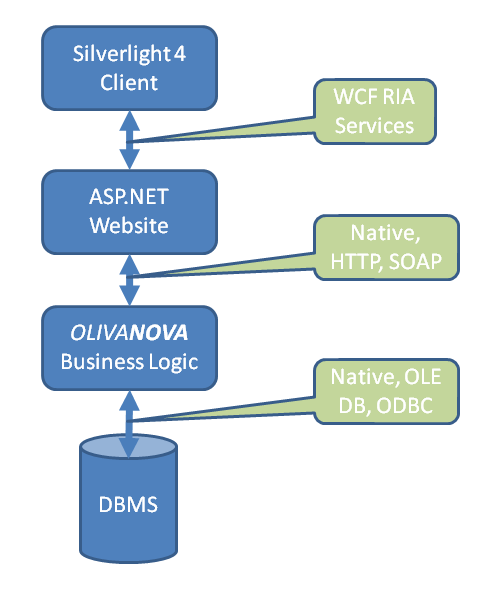
For the application itself I used a very simple model I typically use in demos. It is an expense claim solution. I generated the source code for MS SQL Server, .NET C# business logic (server tier) and ASP.NET C# for the user interface. All of this is usually done in a matter of minutes.
Next, I opened up Visual Web Developer 2010 Express and created a new project using the Silverlight Business Application template (please have a look at the [Silverlight website](https://de.wikipedia.org/wiki/Microsoft_Silverlight) (original URL ) for prerequisites. This template creates two Visual Studio projects:
- _BusinessApplication_: the actual silverlight client
- _BusinessApplication.Web_: a ASP.NET website that integrates the Silverlight assembly (.xap file)
The communication framework (Native, HTTP, SOAP, ...) between the ASP.NET website and the _OLIVA**NOVA**_ business logic has already been generated for me. So, to make it really easy, I simply re-use all of these layers (i.e. "_Adaptor_" layer for XML serialization/parsing, "_Logics_" layer for model-specific services and functionality, ...) and copy them to the _BusinessApplication.Web_ project.
In order to provide the data to the Silverlight client, you need to create a DomainService. Domain services are basically WCF services that specify data operations that are permitted through the domain service. As a first example, I want to get the list of all expense reports in the system. Using the generated _Logics_ layer, I am able to write some code like this:
```csharp
System.Data.DataTable dt = ExpenseReportNS.Logics.ExpenseReport.ClassLogic.ExecuteQueryPopulation( agent, "id\_ExpenseRepor, PresentDate, Status, Cause, TotExpenses, TotExpensesCur", string.Empty, null, 0, ref lastBlock);
```
This call returns a datatable that has to be transferred into a _IEnumerable_ object. Please have a look at the entire code necessary:
```csharp
///
/// RIA Services Domain Service that exposes methods for querying expense data.
///
[EnableClientAccess]
public class ExpenseReportService : DomainService
{
public ExpenseReportEntities GetExpenseReports()
{
ExpenseReportNS.Oids.AdminOid agent = new ExpenseReportNS.Oids.AdminOid("1");
ExpenseReportNS.Logics.Logic.Adaptor.Authenticate(agent, "1");
ExpenseReportNS.Logics.Logic.Agent = agent;
bool lastBlock = false;
System.Data.DataTable dt = ExpenseReportNS.Logics.ExpenseReport.ClassLogic.ExecuteQueryPopulation(
agent,
"id_ExpenseRepor, PresentDate, Status, Cause, TotExpenses, TotExpensesCur",
string.Empty,
null,
0,
ref lastBlock);
ExpenseReportEntity[] erEntities = null;
if (dt != null &&
dt.Rows != null &&
dt.Rows.Count > 0)
{
erEntities = new ExpenseReportEntity[dt.Rows.Count];
int i = 0;
foreach (System.Data.DataRow row in dt.Rows)
{
ExpenseReportEntity e = new ExpenseReportEntity(
int.Parse(row["id_ExpenseRepor"].ToString()),
DateTime.Parse(row["PresentDate"].ToString()),
int.Parse(row["Status"].ToString()),
row["Cause"].ToString(),
decimal.Parse(row["TotExpenses"].ToString()),
decimal.Parse(row["TotExpensesCur"].ToString()));
erEntities[i] = e;
i++;
}
}
ExpenseReportEntities expenseReportEntities = new ExpenseReportEntities(erEntities);
return expenseReportEntities;
}
```
So, now lets take care of the actual Silverlight user interface. Here, I added a new view named _ExpenseReport.xaml_ to the _Views_ folder and incorporated it in the application menu (MainPage.xaml). Within the content _StackPanel_ of the _ExpenseReport.xaml_ I then added the following controls:
- DomainDataSource: WCF RIA Services provides the DomainDataSource control to simplify the interaction between the user interface and data from a domain context. With the DomainDataSource, you can retrieve, shape, and edit data using only declarative syntax. You specify the domain context to use with the DomainDataSource, and then call the operations that are available through that domain context.
- DataGrid: shows the expenses data returned by the WCF RIA Service (DomainService)
- DataPager: allows paging of the entire dataset returned by the WCF RIA Service (DomainService)
The entire XAML added looks like this:
```xml
```
I can refer to the WCF RIA Service by specifying the _DomainContext_ of the _DomainDataSource_ to _ExpenseReportContext_. This refers to code that has been generated for me by Visual Studio. The _QueryName_ attribute specifies the service to be executed. Here we enter the name of the method in the _DomainService_. In this case _GetExpenseReportsQuery_.
The _DataGrid_ then uses this _DomainDataSource_ and binds all data. It automatically generates all columns for me. Similiar the _DataPager_ is set-up.
This is basically all there is to it. The Silverlight client then looks like this:
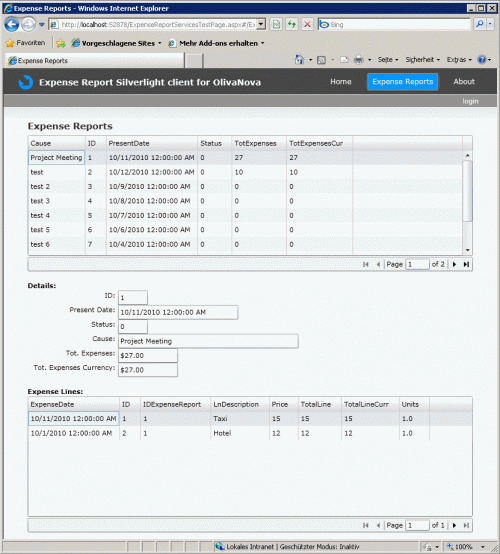
As you can see, the data grid shows all the expense reports and uses the data pager in order to add some paging to it.
In a similiar fashion I also added some details for the currently selected expense report and all expense lines attached to the expense report.
At the end of the day, the hardest part was for me to understand the concept of WCF RIA Services and how to access and show data in Silverlight. It would be interesting to see whether I can also enhance any ASP.NET website with WCF RIA Service functionality or if there is anything special in the Visual Studio _BusinessApplication.Web_ project that has been created for me based on the template.
I am pretty sure that a lot of this additional code, that I had to implement (DomainService, Entity class and so on), could also be generated by _OLIVA**NOVA**_. But, als always, there is a lot more to it, than just showing data in a grid. Some of these things are:
- Authentication
- Role permissions to execute services and to view certain data (on a class or attribute level)
- User interface patterns: _OLIVA**NOVA**_ offers a huge set of user interface functionality like dependency patterns (a user enters data in one field on the screen and another field gets updated, calculated or will be mandatory based on the content), navigational filtering, default values, and so on
- ...